
362 lines
7.4 KiB
Markdown
362 lines
7.4 KiB
Markdown
# @hono/vite-dev-server
|
|
|
|
`@hono/vite-dev-server` is a Vite Plugin that provides a custom dev-server for `fetch`-based web applications like those using Hono.
|
|
You can develop your application with Vite. It's fast.
|
|
|
|
## Features
|
|
|
|
- Support any `fetch`-based applications.
|
|
- Hono applications run on.
|
|
- Fast by Vite.
|
|
- HMR (Only for the client side).
|
|
- Adapters are available, e.g., Cloudflare.
|
|
- Also runs on Bun.
|
|
|
|
## Demo
|
|
|
|
https://github.com/honojs/vite-plugins/assets/10682/a93ee4c5-2e1a-4b17-8bb2-64f955f2f0b0
|
|
|
|
## Supported applications
|
|
|
|
You can run any application on `@hono/vite-dev-server` that uses `fetch` and is built with Web Standard APIs. The minimal application is the following.
|
|
|
|
```ts
|
|
export default {
|
|
fetch(_request: Request) {
|
|
return new Response('Hello Vite!')
|
|
},
|
|
}
|
|
```
|
|
|
|
This code can also run on Cloudflare Workers or Bun.
|
|
And if you change the entry point, you can run on Deno, Vercel, Lagon, and other platforms.
|
|
|
|
Hono is designed for `fetch`-based applications like this.
|
|
|
|
```ts
|
|
import { Hono } from 'hono'
|
|
|
|
const app = new Hono()
|
|
|
|
app.get('/', (c) => c.text('Hello Vite!'))
|
|
|
|
export default app
|
|
```
|
|
|
|
So, any Hono application will run on `@hono/vite-dev-server`.
|
|
|
|
## Usage
|
|
|
|
### Installation
|
|
|
|
You can install `vite` and `@hono/vite-dev-server` via npm.
|
|
|
|
```bash
|
|
npm i -D vite @hono/vite-dev-server
|
|
```
|
|
|
|
Or you can install them with Bun.
|
|
|
|
```bash
|
|
bun add vite @hono/vite-dev-server
|
|
```
|
|
|
|
### Settings
|
|
|
|
Add `"type": "module"` to your `package.json`. Then, create `vite.config.ts` and edit it.
|
|
|
|
```ts
|
|
import { defineConfig } from 'vite'
|
|
import devServer from '@hono/vite-dev-server'
|
|
|
|
export default defineConfig({
|
|
plugins: [
|
|
devServer({
|
|
entry: 'src/index.ts', // The file path of your application.
|
|
}),
|
|
],
|
|
})
|
|
```
|
|
|
|
### Development
|
|
|
|
Just run `vite`.
|
|
|
|
```bash
|
|
npm exec vite
|
|
```
|
|
|
|
Or
|
|
|
|
```bash
|
|
bunx --bun vite
|
|
```
|
|
|
|
## Options
|
|
|
|
The options are below.
|
|
|
|
```ts
|
|
export type DevServerOptions = {
|
|
entry?: string
|
|
export?: string
|
|
injectClientScript?: boolean
|
|
exclude?: (string | RegExp)[]
|
|
ignoreWatching?: (string | RegExp)[]
|
|
adapter?: {
|
|
env?: Env
|
|
onServerClose?: () => Promise<void>
|
|
}
|
|
handleHotUpdate?: VitePlugin['handleHotUpdate']
|
|
}
|
|
```
|
|
|
|
Default values:
|
|
|
|
```ts
|
|
export const defaultOptions: Required<Omit<DevServerOptions, 'cf'>> = {
|
|
entry: './src/index.ts',
|
|
injectClientScript: true,
|
|
exclude: [
|
|
/.*\.css$/,
|
|
/.*\.ts$/,
|
|
/.*\.tsx$/,
|
|
/^\/@.+$/,
|
|
/\?t\=\d+$/,
|
|
/^\/favicon\.ico$/,
|
|
/^\/static\/.+/,
|
|
/^\/node_modules\/.*/,
|
|
],
|
|
ignoreWatching: [/\.wrangler/],
|
|
handleHotUpdate: ({ server, modules }) => {
|
|
const isSSR = modules.some((mod) => mod._ssrModule)
|
|
if (isSSR) {
|
|
server.hot.send({ type: 'full-reload' })
|
|
return []
|
|
}
|
|
},
|
|
}
|
|
```
|
|
|
|
### `injectClientScript`
|
|
|
|
If it's `true` and the response content type is "HTML", inject the script that enables Hot-reload. default is `true`.
|
|
|
|
### `exclude`
|
|
|
|
The paths that are not served by the dev-server.
|
|
|
|
If you have static files in `public/assets/*` and want to return them, exclude `/assets/*` as follows:
|
|
|
|
```ts
|
|
import devServer, { defaultOptions } from '@hono/vite-dev-server'
|
|
import { defineConfig } from 'vite'
|
|
|
|
export default defineConfig({
|
|
plugins: [
|
|
devServer({
|
|
exclude: ['/assets/*', ...defaultOptions.exclude],
|
|
}),
|
|
],
|
|
})
|
|
```
|
|
|
|
### `ignoreWatching`
|
|
|
|
You can add target directories for the server to watch.
|
|
|
|
### `adapter`
|
|
|
|
You can pass the `env` value of a specified environment to the application.
|
|
|
|
## Adapter
|
|
|
|
### Cloudflare
|
|
|
|
You can pass the Bindings specified in `wrangler.toml` to your application by using "Cloudflare Adapter".
|
|
|
|
Install miniflare and wrangler to develop and deploy your cf project.
|
|
|
|
```bash
|
|
npm i -D wrangler miniflare
|
|
```
|
|
|
|
```ts
|
|
import devServer from '@hono/vite-dev-server'
|
|
import cloudflareAdapter from '@hono/vite-dev-server/cloudflare'
|
|
import { defineConfig } from 'vite'
|
|
|
|
export default defineConfig(async () => {
|
|
return {
|
|
plugins: [
|
|
devServer({
|
|
adapter: cloudflareAdapter,
|
|
}),
|
|
],
|
|
}
|
|
})
|
|
```
|
|
|
|
### Node.js & Bun
|
|
|
|
No additional dependencies needed.
|
|
|
|
```ts
|
|
import devServer from '@hono/vite-dev-server'
|
|
import nodeAdapter from '@hono/vite-dev-server/node'
|
|
// OR
|
|
// import bunAdapter from '@hono/vite-dev-server/bun'
|
|
import { defineConfig } from 'vite'
|
|
|
|
export default defineConfig(async () => {
|
|
return {
|
|
plugins: [
|
|
devServer({
|
|
adapter: nodeAdapter,
|
|
// OR
|
|
// adapter: bunAdapter,
|
|
}),
|
|
],
|
|
}
|
|
})
|
|
```
|
|
|
|
## Client-side
|
|
|
|
You can write client-side scripts and import them into your application using Vite's features.
|
|
If `/src/client.ts` is the entry point, simply write it in the `script` tag.
|
|
Additionally, `import.meta.env.PROD` is useful for detecting whether it's running on a dev server or in the build phase.
|
|
|
|
```tsx
|
|
app.get('/', (c) => {
|
|
return c.html(
|
|
<html>
|
|
<head>
|
|
{import.meta.env.PROD ? (
|
|
<script type='module' src='/static/client.js'></script>
|
|
) : (
|
|
<script type='module' src='/src/client.ts'></script>
|
|
)}
|
|
</head>
|
|
<body>
|
|
<h1>Hello</h1>
|
|
</body>
|
|
</html>
|
|
)
|
|
})
|
|
```
|
|
|
|
In order to build the script properly, you can use the example config file `vite.config.ts` as shown below.
|
|
|
|
```ts
|
|
import { defineConfig } from 'vite'
|
|
import devServer from '@hono/vite-dev-server'
|
|
|
|
export default defineConfig(({ mode }) => {
|
|
if (mode === 'client') {
|
|
return {
|
|
build: {
|
|
rollupOptions: {
|
|
input: ['./app/client.ts'],
|
|
output: {
|
|
entryFileNames: 'static/client.js',
|
|
chunkFileNames: 'static/assets/[name]-[hash].js',
|
|
assetFileNames: 'static/assets/[name].[ext]',
|
|
},
|
|
},
|
|
emptyOutDir: false,
|
|
copyPublicDir: false,
|
|
},
|
|
}
|
|
} else {
|
|
return {
|
|
build: {
|
|
minify: true,
|
|
rollupOptions: {
|
|
output: {
|
|
entryFileNames: '_worker.js',
|
|
},
|
|
},
|
|
},
|
|
plugins: [
|
|
devServer({
|
|
entry: './app/server.ts',
|
|
}),
|
|
],
|
|
}
|
|
}
|
|
})
|
|
```
|
|
|
|
You can run the following command to build the client script.
|
|
|
|
```bash
|
|
vite build --mode client
|
|
```
|
|
|
|
## Frequently Asked Questions
|
|
|
|
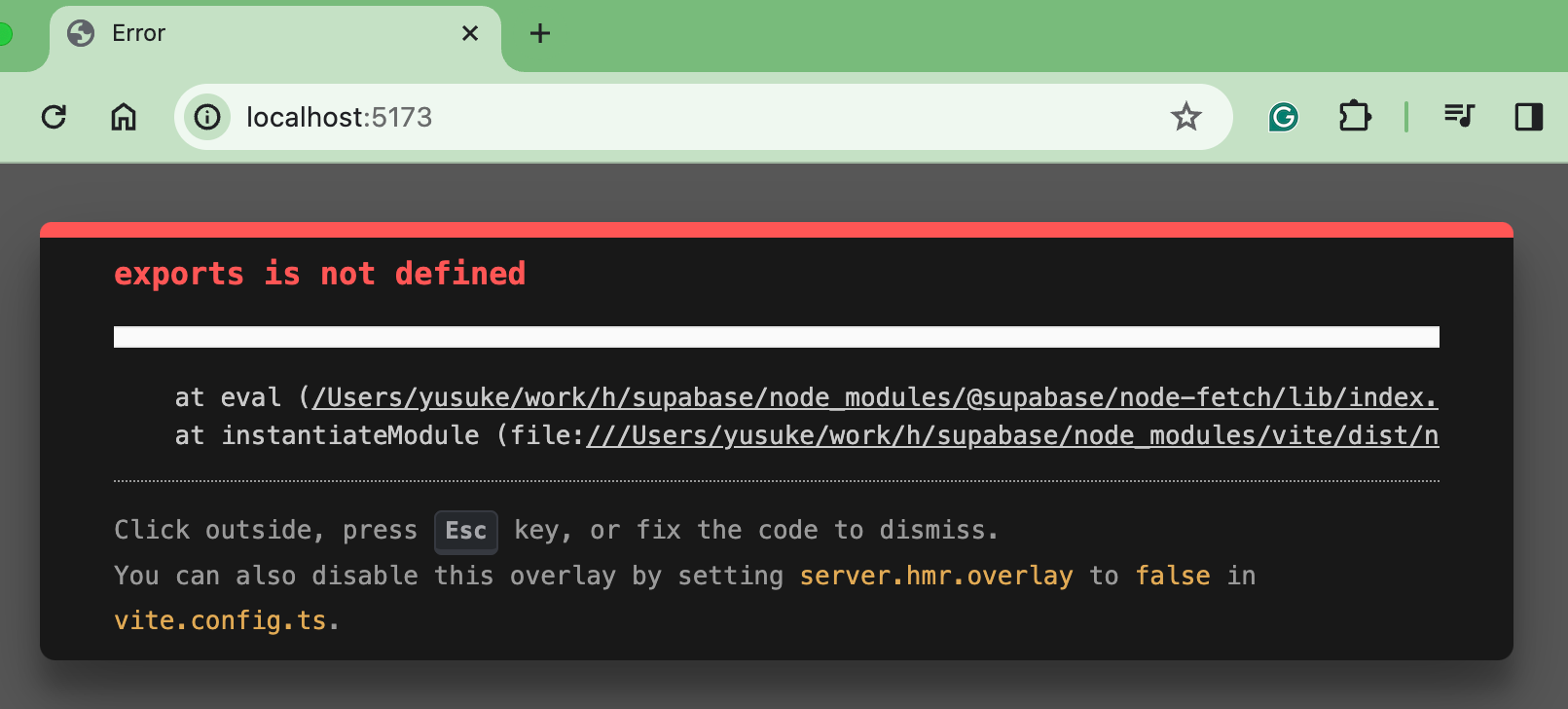
### exports is not defined
|
|
|
|
If you use a package that only supports CommonJS, you will encounter the error `exports is not defined`.
|
|
|
|
|
|
|
|
In that case, specify the target package in `ssr.external` in `vite.config.ts`:
|
|
|
|
```ts
|
|
export default defineConfig({
|
|
ssr: {
|
|
external: ['react', 'react-dom'],
|
|
},
|
|
plugins: [devServer()],
|
|
})
|
|
```
|
|
|
|
### Importing Asset as URL is not working
|
|
|
|
If you want to [import assets as URL](https://vitejs.dev/guide/assets) with the following code, the `logo` image may not be found.
|
|
|
|
```tsx
|
|
import { Hono } from 'hono'
|
|
|
|
import logo from './logo.png'
|
|
|
|
const app = new Hono()
|
|
|
|
app.get('/', async (c) => {
|
|
return c.html(
|
|
<html>
|
|
<body>
|
|
<img src={logo} />
|
|
</body>
|
|
</html>
|
|
)
|
|
})
|
|
|
|
export default app
|
|
```
|
|
|
|
This is because `logo.png` is served from this dev-server, even though it is expected to be served from Vite itself. So to fix it, you can add `*.png` to the `exclude` option:
|
|
|
|
```ts
|
|
import devServer, { defaultOptions } from '@hono/vite-dev-server'
|
|
|
|
export default defineConfig({
|
|
plugins: [
|
|
devServer({
|
|
entry: 'src/index.tsx',
|
|
exclude: [/.*\.png$/, ...defaultOptions.exclude],
|
|
}),
|
|
],
|
|
})
|
|
```
|
|
|
|
## Authors
|
|
|
|
- Yusuke Wada <https://github.com/yusukebe>
|
|
|
|
## License
|
|
|
|
MIT
|